Circle Detection
Introduction
This section teaches how to use OpenCV to detect circles in an image.
Experiment Objective
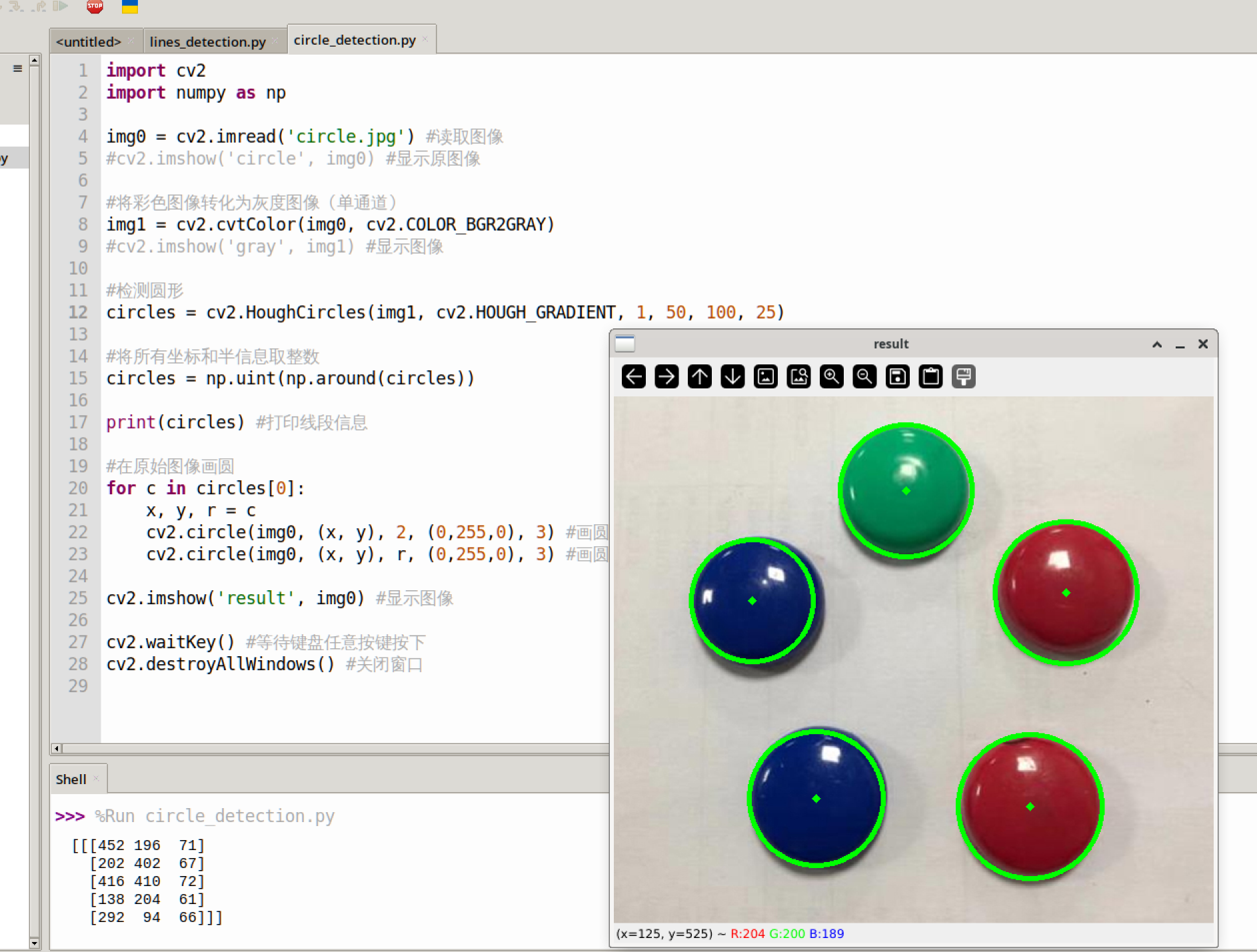
Detect circles in an image and draw them for display.
Experiment Explanation
The OpenCV Python library provides the HoughCircles() function for detecting circles in an image.
HoughCircles() Usage
circles = cv2.HoughCircles(image, method, dp, minDist, param1, param2, minRadius, maxRadius)
Circle detection. Returns circles as an array of multiple circles (center coordinates + radius). Example: [[x0,y0,r0],[x1,y1,r1]]
image: Original image.method: Detection method; defaults tocv2.HOUGH_GRADIENT.dp: Accumulator resolution setting, usually 1.minDist: Minimum distance between circle centers.param1: Maximum threshold for Canny edge detection (optional).param2: The larger the value, the smaller and more precise the detected circles (optional).minRadius: Minimum radius of detected circles (optional).maxRadius: Maximum radius of detected circles (optional).
Read the image, convert it to a grayscale image, and then perform circle detection. The code flow is as follows:
The reference code is as follows:
'''
Experiment Name: Circle Detection
Experiment Platform: WalnutPi 1B
'''

import cv2
import numpy as np

img0 = cv2.imread('circle.jpg') # Read the image
cv2.imshow('circle2', img0) # Display the original image

# Convert the color image to a grayscale image (single channel)
img1 = cv2.cvtColor(img0, cv2.COLOR_BGR2GRAY)
#cv2.imshow('gray', img1) # Display the image

# Detect circles
circles = cv2.HoughCircles(img1, cv2.HOUGH_GRADIENT, 1, 50, 100, 20)

# Convert all coordinate and radius information to integers
circles = np.uint(np.around(circles))

print(circles) # Print circle information

# Draw circles on the original image
for c in circles[0]:
    x, y, r = c
    cv2.circle(img0, (x, y), 2, (0,255,0), 3) # Draw the center point
    cv2.circle(img0, (x, y), r, (0,255,0), 3) # Draw the circle outline

cv2.imshow('result', img0) # Display the image

cv2.waitKey() # Wait for any keyboard key to be pressed
cv2.destroyAllWindows() # Close the window
Experiment Results
Run the above code on the WalnutPi; the experiment results are as follows. You can see that the circular objects are detected: